
Are you one of those people that are hard pressed whenever they have to make a decision? It can be about basic things like asking a girl out, eating or buying some new household items. It could also be about life changing things like jobs, moving or buying larger items like cars or apartments.


A computer program helping in the decision making could be an asset as long as there are criteria that can be weighted. To give an example. The question about the next summer vacation could be broken down in criteria like temperature, beach access, distance or costs and information on how to value the parameters. For temperature it could be the higher the better, beach access should be yes, distance should be as low as possible and costs as well.

The locations would then be added as options and values assigned to every criteria. Option 1 could be Sweden with a mean temperature of 25 degrees Celsius, beach access, 1800 kilometers distance and a total cost of 1200 Dollar per person. Option 2 could be Madagascar with a mean temperature of 35 degrees, 2600 kilometers distance and a total cost of $1500 Dollar per person.

The computer would then compute the results and present them to the user. Decision Oven is that program. It can do everything that has been mentioned in the article.
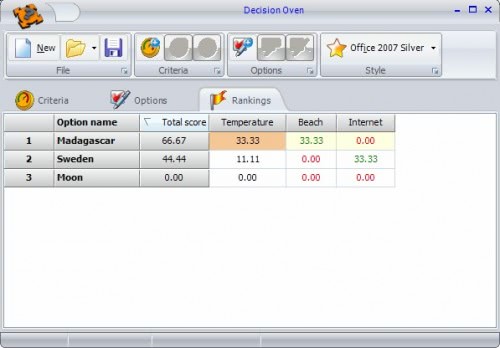


The application will display a total score and rank the options accordingly. It is of course up to you to convince your girlfriend to postpone the marriage because the computer said so.


Click Here To Download
Jarte is a free portable word processing application built on the framework of Microsoft WordPad. Don't be deceived by it's spartan lineage however, WordPad serves only as the undercarriage of Jarte's feature set. Jarte is designed around the most frequent needs of the average user. By putting commonly used tools and features in the menus immediately accessibly by the toolbar buttons, users aren't left digging through menus when they'd rather be writing. Jarte supports tabbed based word processing, dictionary files, spell check, and a favorites system for bookmarking favorite folders, files, and fonts.

General Features

  • Fully compatible with Windows Vista
  • Tabbed interface to provide easy access to open documents
  • Opens files with file extension RTF, file extension DOC, and file extension DOCX (new default format in Word 2007)
  • Fast start up
  • Compact screen size
  • Hot Connect lets you use Jarte with other programs
  • Optional "Clickless Operation" feature greatly reduces clicking
  • Can be run directly from a pluggable USB flash drive
  • High quality spell checker with custom user dictionary
  • Included spelling dictionaries: English (American, British, & Canadian), Spanish, French, German, Italian, and Dutch
  • Link to, or import, your existing custom Word spelling dictionaries
  • Support for templates
  • Export to HTML or PDF
  • Single click bookmarking and bookmark navigation
  • Send documents via e-mail
  • Full drag and drop file support
  • Instant access to recently opened documents and folders
  • Instant access to documents and folders designated as favorites
  • Adjustable document zoom
  • Detailed Help documentation

Editing Functions

  • Insert pictures, hyperlinks, tables, page breaks, equations and other embeddable objects
  • Quick Clips option provides easy copy, cut and paste capability using the mouse scroll wheel button
  • Standard clipboard functions plus a Paste Plain function which strips HTML and RTF formatting from clipboard text before pasting
  • Multi-level undo and redo functions
  • Sorting

Font Formatting

  • Bold, italic, underline, strikeout, subscript, and superscript font styles
  • Choice of text colors
  • Text highlight tool with choice of colors
  • Font typeface selection box which displays each font choice in its own typeface
  • Choose your own default font
  • Quick access to your personally chosen favorite fonts and to recently used fonts
  • Format brush tool quickly applies font styling to text

Paragraph Formatting

  • Left, right, centered, and justified text alignment
  • Paragraph indentation including first line and hanging indent styles
  • Bulleted and numbered list styles
  • Single, one and a half, and double line spacing
  • Optional paragraph spacing before and after paragraphs
  • User settable tab stops
  • Format brush tool quickly applies formatting to paragraphs

Printing

  • Print preview
  • User definable page margins
  • Reverse page order option and odd or even pages only options (useful for double sided printing) in addition to the standard print options
  • Visual designer allows complete control of both headers and footers:
    • Define any combination of left side, right side, and center headers and footers
    • Headers and footers may contain any combination of page numbering, file date, current date (in choice of date formats), file name, and user definable text
    • User control of the font typeface, font size, font style, and font color used for headers and footers
    • User control of the positioning of the header and footer lines
    • Optional suppression of the header and/or footer on the first page

Tools

  • Clip List allows you display and reuse the 25 most recent clipboard clips
  • Screen capture tool for copying images from the screen
  • Special Characters Keyboard allows single click insertion of any character including the extended characters not shown on your keyboard
  • Reference Bar provides instant word lookup to online dictionary, thesaurus, and encyclopedia
  • The Reference Bar also automatically integrates with the WordWeb dictionary and thesaurus if it is installed
  • Document word count tool
  • Search for files on your computer with direct access to the system file search tool


Click Here To Download(Size: 2.8mb)

Hard Drive Noise Reduction Software

Posted by NiGhT StaLKeR | 10:58 AM | | 0 comments »

Being noise sensitive can have a huge impact on a daily work routine. Having to use a noisy computer can be a distraction and it might even cause sickness in the long run. One of the components that still gets neglected quite a bit when it comes to noise reduction is the computer’s hard drive. That’s understandable because it usually is not the loudest component of the computer.

That honor would be reserved for the fans of the video card, processor, power unit and case. You might not even hear the noise of the hard drive until you decide to lower down the noise of the other components. Hard drives on the other hand can cause a very high distracting pitching noise.

One possibility to lower the noise of the hard drive would be to use special hard drive cases and other hardware to reduce the noise. Software solutions on the other hand are rare, most are outdated and some even require the creation of a boot disk before they can be run.

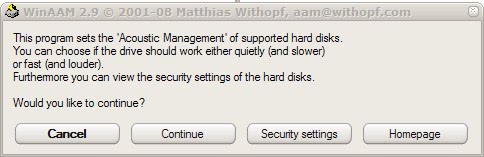
WinAAM is a refreshing change. It is compatible with all Windows NT operating systems including the popular Windows XP and Windows Vista. It requires no installation and can be started right after the download has finished.

The software will automatically detect connected IDE or SATA drives and display the status of the Acoustic Management of the device.

acoustic management

The status can either be inactive, low or normal and the noise reduction software displays possible options the acoustic management can be set to in a basic interface. The option to test the changes is given in the application but it was badly implemented. Changing a setting will close the application at the end which means that the application has to be started again to perform the test.


Click Below To Download For:

FragExt

Posted by NiGhT StaLKeR | 10:26 AM | | 0 comments »

Free application FragExt adds an entry to your right-click context menu so you can defragment individual files on demand. To use it, just right-click the file you want to defrag, then select FragExt -> Defragment. You can also run reports on the fragmentation of individual files and copy it to your clipboard, a file, or just view it in a newly minted tab in the file properties. If defragmentation is a major issue for you, your best bet is to find a good defrag app and set up automated runs. If you just need to defrag a large file every now and then, FragExt or the previously mentioned Defraggler will do the job nicely.


Click Below To Download For:

The New York Times is running an article about an unsigned Microsoft Word document circulated by the Democratic National Committee lodging criticisms against Samuel Alito, President Bush's latest Supreme Court nomination.

The unsigned document rubbed many readers the wrong way. Luckily for them, it wasn't hard to figure out with whom to get upset. That's because the document's metadata contained the author's name and then some.R

The article describes a few more metadata missteps, each entirely avoidable. The Times also offers a solution:

Saving a copy of a document in "rich text format" (RTF), or as a simple text file first (options in the Save menu), and then converting it into the common "portable document format" (PDF) before circulating it is a good tack, Mr. Kennedy said.

Not bad, but Microsoft offers a free add-in designed specifically to clean up messy, incriminating metadata. The Remove Hidden Data tool is your best bet in avoiding embarrassing metadata mistakes.
